# Cross-account API access
When other ucloud-globalglobal accounts apply to you for access to resources via the API, you can assign permissions to them via the [Role] + [STS] function. The scope of their access (e.g., project scope, product scope, etc.) is determined by the role you assign.
## Applicable Scenarios
You can enable your other ucloud-global accounts to assume the roles of existing ucloud-globalglobal accounts and manage resources within their permissions by using temporary security keys generated from cross-account access roles.
## pre-conditions
Having multiple ucloud-globalglobal master accounts. In this document, let's assume that you have two ucloud-globalglobal accounts A, the grantor, and B, the accessor, and let's assume that account B wants to manage the resources under account A.
## Steps
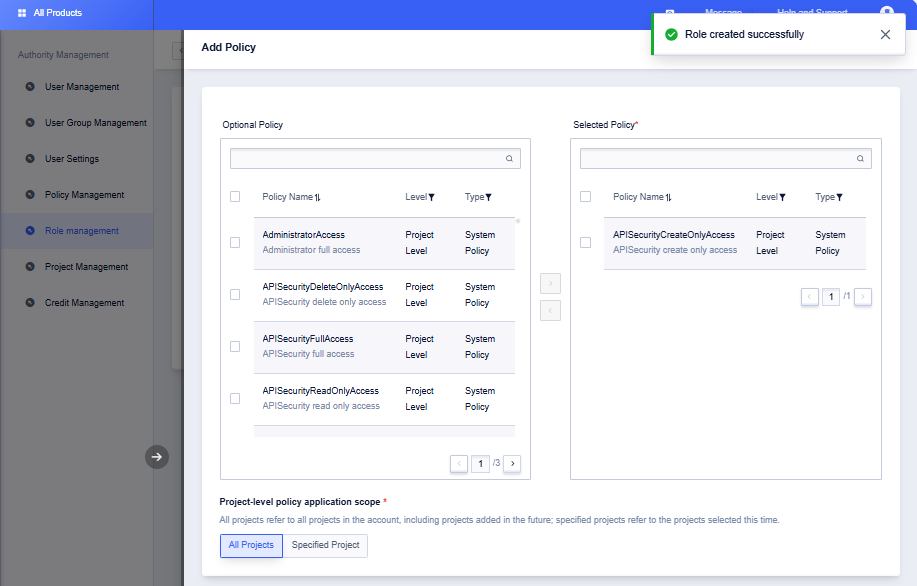
1. Authorized party creates roles
- Log in to the console using A's main account and go to [Access Control] -> [Role Management].
- Create customized roles
- Click on the corresponding role details to add actionable functions and resource scope permissions to the role
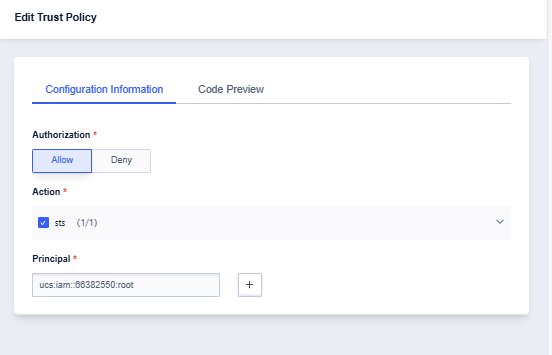
2. Authorized parties add access parties to the trust policy of the role.
- Click the “Details” button of the corresponding role, select “Trust Policies” and click “Edit Policy”.
- Enter “ucs:iam::xxxxxxxx:root” for “Principal”, xxxxxxxx is the account number of the accessing party, i.e., Company ID (you can view it by clicking the avatar on the console). Company ID)
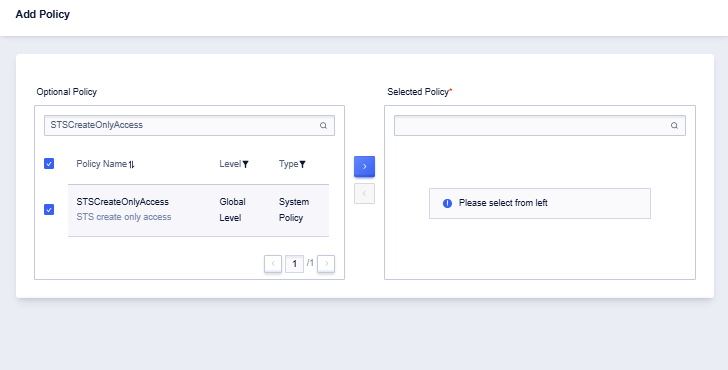
3. Use the party to create a sub-user and add the permission to invoke STS to generate a temporary security key.
- Log in to the console using B's main account, go to [Access Control] -> [User Management], and invite subusers.
- Click the Add Privilege button of the corresponding sub-user.
- Search for “STSCreateOnlyAccess” policy and add it.
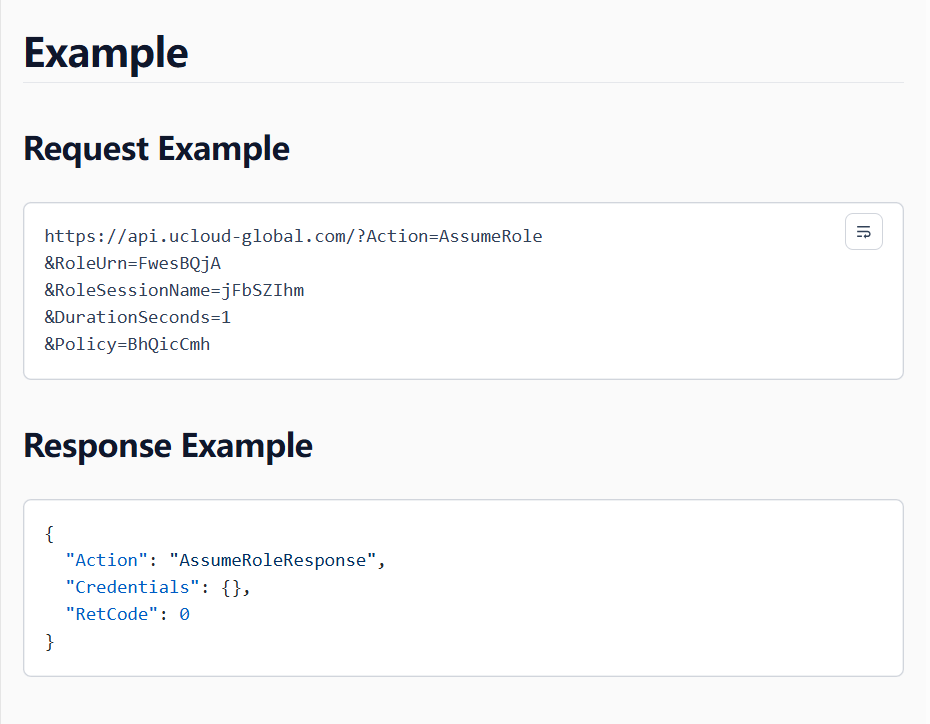
4. The user invokes the STS service AssumeRole interface through the sub-account to generate a temporary security key
```
Note: The STS Get Temporary Identity Credentials for Playing Roles API description documentation is available:https://www.ucloud-global-global.com/en/docs/api/sts-api
```
Call the interface to get the following three pieces of information and proceed to step 5:
- SecurityToken: Security Token
- AccessKeyId: Key ID
- AccessKeySecret: key secret
5. Use the temporary security key generated in step 4 to play the role authorized by Account A. Within the scope of the role's privileges, you can invoke the interface you need to manage ucloud-global resources in any of the following ways:
- CloudShell Cloud Command Line
- Multi-language OpenSDK / Go / Python
CloudShell Example
```
ucloud-global api --Action AssumeRole --RoleUrn ucs:iam::xxxx:role/test --RoleSessionName test-session
```
SDK Example
```
package main
import (
"fmt"
"os"
"github.com/ucloud/ucloud-sdk-go/services/sts"
"github.com/ucloud/ucloud-sdk-go/services/uhost"
"github.com/ucloud/ucloud-sdk-go/ucloud"
"github.com/ucloud/ucloud-sdk-go/ucloud/auth"
"github.com/ucloud/ucloud-sdk-go/ucloud/log"
"github.com/ucloud/ucloud-sdk-go/ucloud/request"
)
// loadConfig load ucloud config and credential
func loadConfig() (*ucloud.Config, *auth.Credential) {
cfg := ucloud.NewConfig()
cfg.LogLevel = log.DebugLevel
cfg.BaseUrl = "https://api.ucloud-global.com
credential := auth.NewCredential()
credential.PrivateKey = os.Getenv("UCLOUD_PRIVATE_KEY")
credential.PublicKey = os.Getenv("UCLOUD_PUBLIC_KEY")
log.Info("setup clients ...")
return &cfg, &credential
}
func main() {
// get sts credential
cfg, credential := loadConfig()
stsClient := sts.NewClient(cfg, credential)
var assumeRoleRequest sts.AssumeRoleRequest
assumeRoleRequest.RoleUrn = ucloud.String("ucs:iam::xxxx:role/test")
assumeRoleRequest.RoleSessionName = ucloud.String("test-session")
assumeRoleResponse, err := stsClient.AssumeRole(&assumeRoleRequest)
if err != nil {
panic(err)
}
fmt.Println(assumeRoleResponse.Credentials.AccessKeyId)
// the token from AssumeRole has an expiration time
fmt.Println(assumeRoleResponse.Credentials.Expiration)
cred := &auth.Credential{
PublicKey: assumeRoleResponse.Credentials.AccessKeyId,
PrivateKey: assumeRoleResponse.Credentials.AccessKeySecret,
SecurityToken: assumeRoleResponse.Credentials.SecurityToken,
}
// invoke uhost client with the sts credential
uhostClient := uhost.NewClient(cfg, cred)
cfg.ProjectId = os.Getenv("UCLOUD_PROJECT_ID")
cfg.Region = "cn-bj2"
req := &uhost.DescribeUHostInstanceRequest{}
req.SetEncoder(request.NewJSONEncoder(cfg, cred))
resp, err := uhostClient.DescribeUHostInstance(&uhost.DescribeUHostInstanceRequest{})
if err != nil {
log.Errorf("error: %v", err)
} else {
log.Infof("response: %+v", resp)
}
}
```