# Migrate Your Own Public IP Addresses to the Cloud
Enterprises need to use their own public network IP addresses due to the requirements of their business architectures. SCloud supports the migration of self-owned public network IP addresses to the cloud, and users can enjoy the same high-quality network lines and elastic capabilities as with EIP. Users can manage these public network IP addresses as flexibly as they manage EIPs. This article will introduce how to migrate self-owned public network IP addresses to SCloud.
## Migration Constraints
Before migrating your own public IP addresses to the cloud, please note the following restrictions:
- Public IP addresses must be registered with a Regional Internet Registry (RIR).
- You can update routing information on the RIR website to modify the AS number of the public IP segment to **AS135377**. **If you wish to retain your own AS number, this restriction does not apply.**
- The default quota for self-owned public IP addresses is 4x /24 IP segments. To increase the quota, contact your account manager.
- Regions in China's Mainland currently do not support migrating self-owned public IP addresses to the cloud. Supported regions include:
| Region | Supported Regions for Cloud Migration |
|----------------------------|---------------------------------------------------------|
| Asia-Pacific | Hong Kong, Taipei, Singapore, Tokyo, Seoul, Bangkok, Jakarta, Ho Chi Minh City, Manila, Mumbai |
| Americas | Los Angeles, Washington, Sao Paulo |
| Europe, Middle East & Africa | Moscow, Frankfurt, London, Dubai, Lagos |
- Only IPv4 addresses are supported for migration; IPv6 addresses are not supported.
- The minimum subnet mask for migrated IP address segments is /24.
- Cloud Migration Timeline for Self-owned IPs:
Subject to carrier approval for IP broadcast setup. Estimated completion time: 1 month.
- Cloud Removal Timeline for Self-owned IPs:
Subject to carrier approval for IP broadcast termination. Estimated completion time: 1 month.
## Migration Process
### Step 1: Update Routing Information
Update routing information on the Regional Internet Registry (RIR) website by modifying the AS number of your public IP segment to **AS135377** or your own AS number.
**Example: Modifying AS Numbers for APNIC-Distributed IP Addresses**
1. Log in to [https://login.apnic.net/signin](https://login.apnic.net/signin).
2. From the **Resource Manager** list, select **Whois Updates** -> **Whois Updates**.
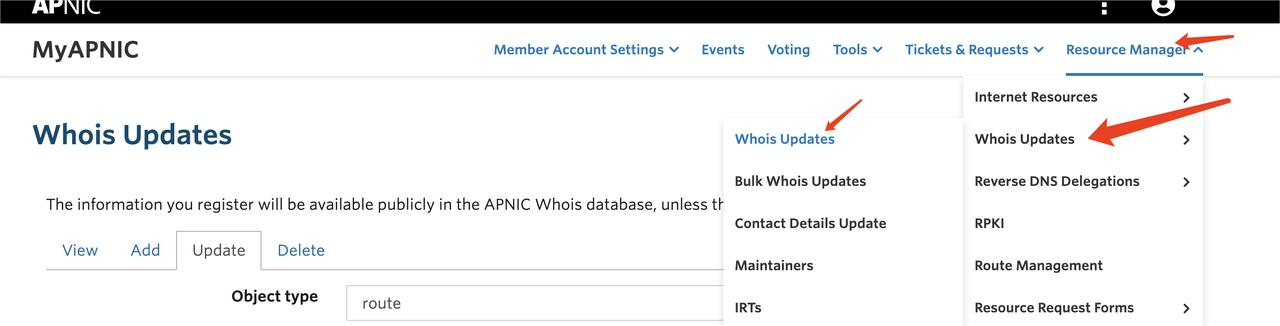
3. Click **Add**, and select **route** from the **Object type** dropdown.
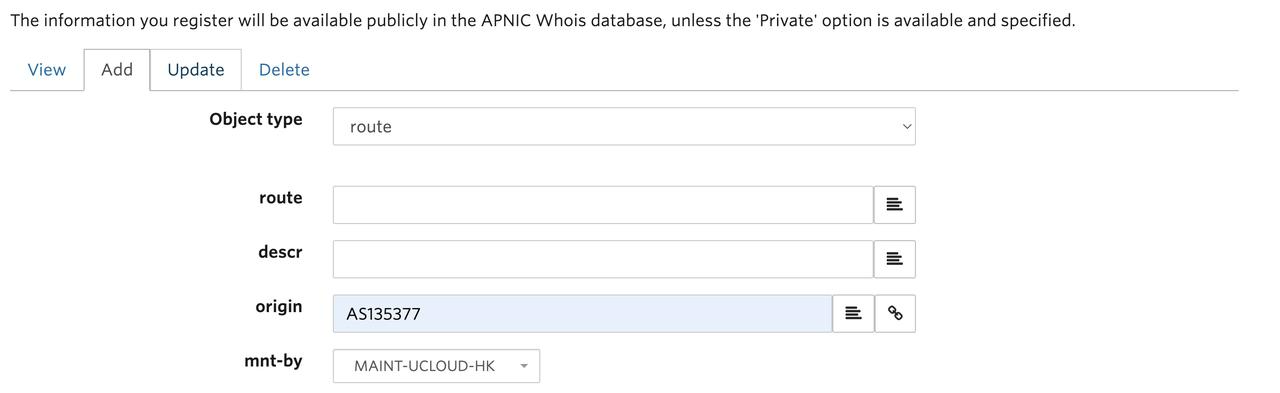
4. Configure fields as follows and click **Submit**.
| Configuration | Description |
|---|---|
| **route** | Enter the self-owned public IP address segment. |
| **origin** | Enter the AS number. In this example, use the fixed value **AS135377**. |
| **descr** | Enter the maintainer name. In this example, use the fixed value: `SCloud INFORMATION TECHNOLOGY (HK) LIMITED FLAT/RM 603 6/F LAWS COMMERCIAL PLAZA 788 CHEUNG SHA WAN ROAD, KL`. |
5. Verify the update via **RADB** after configuration.
### Step 2: Apply for Cloud Migration of Self-owned Public IPs
After updating routing information, contact your **account manager** to apply for migration. Provide the following details:
- Public IP address segment
- Target region for the migrated IPs
- Confirmation of completed routing updates
### Step 3: Request Specific EIPs
Once migrated, your public IP segments will appear in the **IP Resource Pool**. You can request these migrated IPs on the **EIP Purchase Page**.