# Ubuntu 16.04 Environment Setup
## 1. Check GPU Device Recognition
```
$ sudo lspci | grep NVIDIA
3D controller: NVIDIA Corporation GK210GL [Tesla K80] indicates that it is recognized as K80.
3D controller: NVIDIA Corporation GP102GL [Tesla P40] (rev a1) indicates that it is P40.
```
## 2. Block Open Source Driver Nouveau
Edit the following file:
```
sudo vim /etc/modprobe.d/blacklist-nouveau.conf
```
Input the following content:
```
blacklist nouveau
blacklist lbm-nouveau
options nouveau modeset=0
alias nouveau off
alias lbm-nouveau off
```
Update and restart:
```
sudo update-initramfs -u
sudo reboot
sudo apt-get install build-essential pkg-config linux-headers-`uname -r`
```
## 3. Install NVIDIA Driver
### 3.1 Download
Download the appropriate driver from the NVIDIA official website (current version 418.126.02), and the url is https://www.nvidia.com/Download/index.aspx?lang=en-us.
You can also download it from UFile, as it's faster. http://gpu.cn-bj.ufileos.com/NVIDIA-Linux-x86_64-418.126.02.run.
### 3.2 Installation
```
sudo chmod +x NVIDIA-Linux-x86_64-418.126.02.run
sudo ./NVIDIA-Linux-x86_64-418.126.02.run
```
### 3.3 Check Driver Status
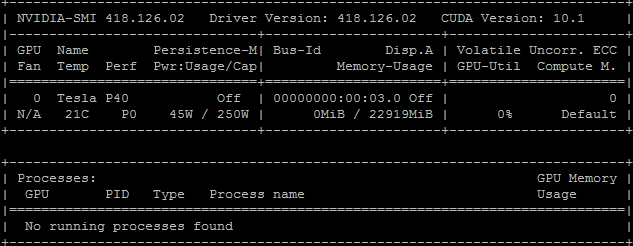
$ sudo nvidia-smi
When the following output appears, it indicates that the GPU driver is normal:
## 4. Install CUDA Library
### 4.1 Network Installation
```
sudo wget https://developer.download.nvidia.com/compute/cuda/repos/ubuntu1604/x86_64/cuda-ubuntu1604.pin
sudo mv cuda-ubuntu1604.pin /etc/apt/preferences.d/cuda-repository-pin-600
sudo apt-key adv --fetch-keys http://developer.download.nvidia.com/compute/cuda/repos/ubuntu1604/x86_64/7fa2af80.pub
sudo add-apt-repository "deb http://developer.download.nvidia.com/compute/cuda/repos/ubuntu1604/x86_64/ /"
sudo apt-get update
sudo apt-get -y install cuda
```
## FAQ
### 1. Why is the GPU utilization rate 100% when I use nvidia-smi?
This problem is caused by the system's inaccurate reading of GPU status information. The following command can correct it and make the system read the command correctly.
#sudo nvidia-smi -pm 1
### 2. In addition to self-installation, are there other ways to obtain driver images?
You may submit a ticket or contact staff to obtain an image that contains GPU driver and Cuda environment made by SCloud, which saves the time of manual installation.